Get 40 Hours Free Developer Trial
Test Our Developers for 40 Hours at No Cost - Start Your Free Trial →
How to Build and Manage AI Agents in Enterprise Apps in 2026
Are you planning to add AI agents to your enterprise product or internal tools in 2026? Many teams begin with a chatbot. Then they quickly see that the real value comes when the system can plan the work, take action, and complete tasks across multiple tools. That is why the focus has shifted to building […]
05 Mar, 2026
How to Build and Manage AI Agents in Enterprise Apps in 2026
Are you planning to add AI agents to your enterprise product or internal tools in 2026? Many teams begin with a chatbot. Then they quickly see that the real value comes when the system can plan the work, take action, and complete tasks across multiple tools.
That is why the focus has shifted to building AI agents for enterprise apps in a way that holds up in real-world operations. It is not only about prompts. It depends on the software architecture that can safely connect to business systems. It also depends on orchestration, so it can hand off tasks and finish an end-to-end workflow without breaking the process.
Enterprises are asking tougher questions now. How do we keep agents reliable? How do we control access? How do we prove outcomes? This shift is also showing up in industry forecasts. Gartner predicts that by 2028, 60% of brands will use agentic AI to deliver streamlined one-to-one interactions.
What are AI Agents?
AI agents are goal-driven systems that can understand a task, plan the next steps, and then take actions across your product instead of only generating text. In practice, they work like a loop: interpret the request, choose an approach, call the right tools or APIs, confirm the result, and then report back with what happened.
In enterprise apps, the key is making agents reliable and controllable. This requires architecture design where they have clear permissions, can use approved data sources, and behave predictably when something fails. This is also where agentic RAG for enterprise becomes useful, because the agent can retrieve the right internal context at the moment it needs it, not just once at the start.
The Evolution of AI Agents in Enterprise Apps
AI agents in enterprise have moved from simple chatbots that answer questions to systems that can actually complete work, because teams realized the real value is not in talking, it is in executing tasks across real tools and workflows. What changed in 2026 is that agents are being built with more production thinking, meaning tighter permissions, better tool connections, clearer boundaries, and more reliable orchestration, so tasks do not fall apart halfway through.
Adoption is also becoming measurable: McKinsey’s State of AI survey found that 23% of organizations said they are already scaling an agentic AI system in at least one business function, and another 39% said they have started experimenting with it.
AI Agents vs Agentic AI for Enterprise Automation
| AI agents | Agentic AI | |
|---|---|---|
| Definition | A purpose-built software “worker” that can interpret an input, decide what to do next, and execute a bounded action (or small sequence of actions) using approved tools. | A system-level approach where the software owns the outcome, planning the steps, coordinating multiple agents and tools, and adapting when reality changes mid-process. |
| Scope | Best for well-scoped, repeatable tasks inside a clear domain or single workflow slice. | Best for cross-system, multi-step processes with dependencies, exceptions, and handoffs. |
| Decision-making | Makes decisions within a defined lane and permission set. | Chooses the workflow path, sequences actions, and reroutes when something fails or a new context appears. |
| What makes it work in an enterprise | Tight boundaries: clear permissions, approved tools, and predictable success/failure behaviour. | Reliable coordination via AI agent orchestration, including shared context, state tracking, retries, escalation, and audit logs. |
| Common pitfall | Expecting one agent to cover an end-to-end process, which often creates partial automation and messy edge cases. | Treating it like a “feature” instead of an operating layer that needs ownership, controls, and standards. |
| When to use which | Use when the workflow is contained, and you can clearly define inputs, outputs, and actions. | Use when the workflow spans tools and teams, and you need orchestration. |
Why Companies Should Invest in AI Agents in 2026
In 2026, companies are investing in AI agents because they complete real work, not just assist. The best use cases are measurable workflows where orchestration, control, and ROI are clear.
Outcomes first
Enterprises are shifting from assistants that “help” to agents that actually finish work, because leaders care more about closed loops than good replies. That push is showing up in how platforms describe agents as action-oriented, not just conversational.
Workflow hotspots
The fastest wins usually come from systems that already log and track work, such as IT service management or internal operations tools. They’re ideal for proving impact because you can measure resolution time and deflection without rebuilding your stack.
Co-ordination needed
As soon as work spans multiple steps, teams, or tools, you need orchestration so tasks don’t stall mid-way. The best guidance treats orchestration as the glue for handoffs, sequencing, and reliable completion, not a bonus feature.

Trust by default
Agents that can act raise the bar on control, because a small mistake can become a real operational incident. That’s why top enterprise pages increasingly emphasize guardrails, transparency, and audit-friendly behaviour as table stakes for rollout.
Proof matters
Nowadays, pilots don’t survive on excitement alone. Teams are expected to show measurable impact in ROI metrics and KPIs, and they’re doing it by tying agent actions to business outcomes, cost signals, and process-level improvements.
High Impact Use Cases
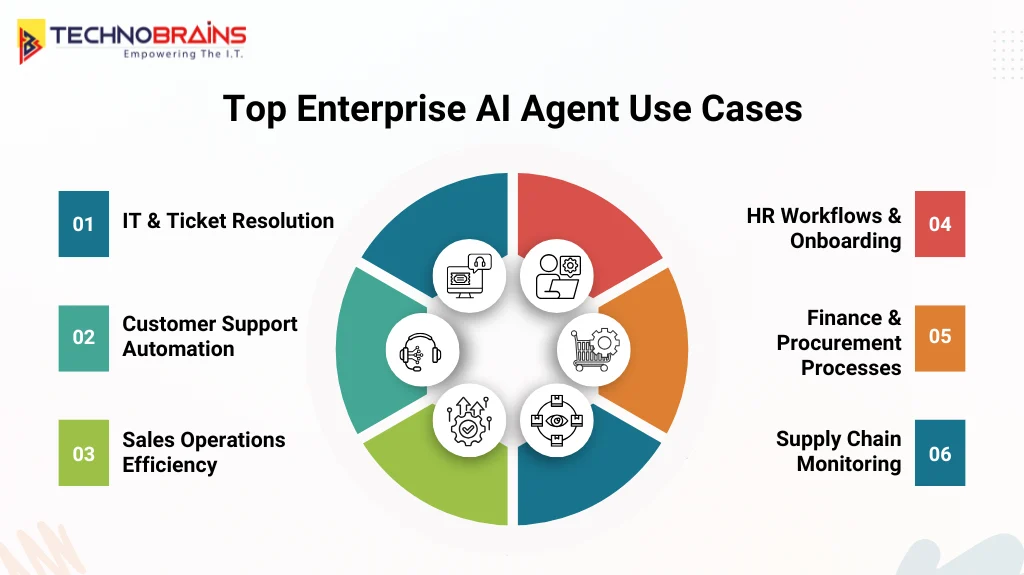
These are the workflows where AI agents deliver the quickest, most measurable value because tasks are repeatable, tracked, and tied to clear outcomes.
1. Ticket resolution
IT and service desks are one of the quickest places to see impact because the work is already structured as tickets, SLAs, and clear resolution steps. With the right orchestration, agents can classify issues, pull relevant context, trigger approved actions, and keep the ticket moving without constant back-and-forth.
2. Customer support
Support teams get results when agents are integrated. It can pull policy context, summarize the full customer history, and recommend the next best action consistently. The biggest gains come from well-scoped workflows where agents resolve common requests end to end and hand off cleanly when a human is needed.
3. Sales operations
Sales ops benefits in the repetitive “busywork” that slows reps down, like research, follow-ups, and CRM hygiene. This is where AI agent integration with Salesforce becomes practical, because it can keep records accurate while helping reps act faster and stay focused on the pipeline.
4. HR workflows
HR is a strong fit because employees ask the same questions repeatedly, but the work still requires real action, like onboarding steps, policy checks, and routing requests. Done right, agents reduce wait times while keeping guardrails in place so changes are controlled and auditable, especially when integrated with HRMS software.
5. Finance operations
Finance and procurement teams can extract details from messy inputs, validate them against rules, and route approvals without delays. These are solid agentic workflows for enterprise automation because success is measurable, but the manual effort is usually high.
6. Supply chain
Supply chain agents work best when they help teams keep up with constant change. They can flag disruptions early, line up updates across systems, and clearly summarize what changed so teams can act quickly. The strongest deployments focus on decisions people can verify rather than trying to automate everything end-to-end.
How AI Agents Automate Enterprise Workflows?
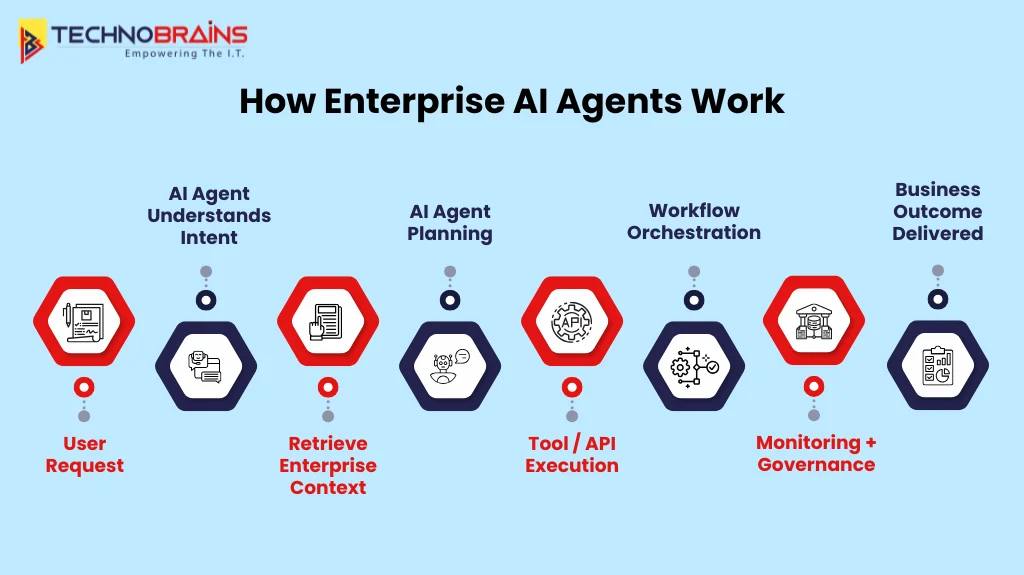
AI agents automate enterprise workflows by turning requests into coordinated actions across approved tools and systems. Reliability comes from orchestration, strong controls, and clear visibility into what the agent did.
Understand the request
It starts by cleaning up the ask. The agent turns a vague request into a clear objective, confirms what “done” looks like, and gathers only the few details it needs to proceed. It also sanity-checks basics up front, who’s asking, what they’re allowed to request, and what actions are even on the table.
Pull the right context
It grabs the context that actually matters, relevant policies, recent history, and the right records while filtering out noise and sensitive data. Your architecture rules guide this step, so the agent stays aligned with your processes instead of guessing.
Take controlled actions
Next, it gets to work using approved tools and APIs, but with guardrails. Permissions are checked, inputs are validated, and actions follow defined rules, so results are safe and repeatable. It’s not “free access,” it’s the same controls a human would operate under, just executed faster and more consistently.
Coordinate the workflow
As tasks stretch across systems, the system keeps track of progress, manages handoffs, waits for approvals when required, and retries when something fails. Orchestration is what stops workflows from stalling or getting messy halfway through, and helps drive them to completion end-to-end.
Measure and improve
After that, teams look at what happened in the real world, tool calls, errors, cost, latency, and outcomes using AI agent monitoring and observability. Those signals make issues visible, and they’re what you use to tighten prompts, tools, policies, and routing so performance keeps improving as usage scales.
Why AI Agent Orchestration Matters in Enterprise Apps
In enterprise apps, real work rarely happens in one clean step. A request usually spans multiple systems, waits on approvals, and can hit timeouts or failures. Without orchestration, agents work out of sync, causing duplicate actions, broken handoffs, and stalled workflows. Orchestration keeps everything on track by sequencing steps, tracking state, and ensuring consistent execution across tools and teams.
It also becomes the control layer that makes scale realistic. You get resumable workflows, predictable retry behavior, and clear traceability into what ran and why, which makes production support far easier. This is why many enterprises pair orchestration with strong AI integration services to connect agents to internal systems in a secure, maintainable way.
Key components of orchestration
- Workflow routing: decides the next step and the right agent or tool for it.
- State management: tracks progress so workflows can pause, resume, and avoid loops.
- Access controls: enforce permissions, approvals, and safe action boundaries.
- Error handling: manages retries, fallbacks, and timeouts without breaking the flow.
- Execution logs: record decisions and tool calls for auditing and debugging.
Governance and Guardrails for Enterprise AI Agents
In enterprise apps, governance is not about trusting the model. It is about building a system where the agent cannot act outside its authority. The strongest patterns are identity first: every action is tied to a real user or service identity, and the agent runs strictly within those permissions, not whatever the prompt suggests.
Guardrails also need to live at the action boundary, because prompts alone will not protect you from risky inputs or manipulation. That is why mature teams route tool calls through policy checks, require approvals for high-impact actions, and keep full audit trails of what the agent did and why. Many teams also bring in AI consulting support here to pressure-test controls early and avoid costly fixes after rollout.
Core controls
- Identity and permissions: least privilege access with role-based scopes for every agent action
- Tool gating: allowlisted tools only with policy checks before execution.
- High-risk approvals: human sign-off for access changes, payments, deletions, and external sharing.
- Audit trails: log intent inputs, tool calls, and outcomes for investigations and compliance.
- Prompt injection defenses: treat external text as untrusted and enforce structured inputs.
How to Scale Agentic Workflows
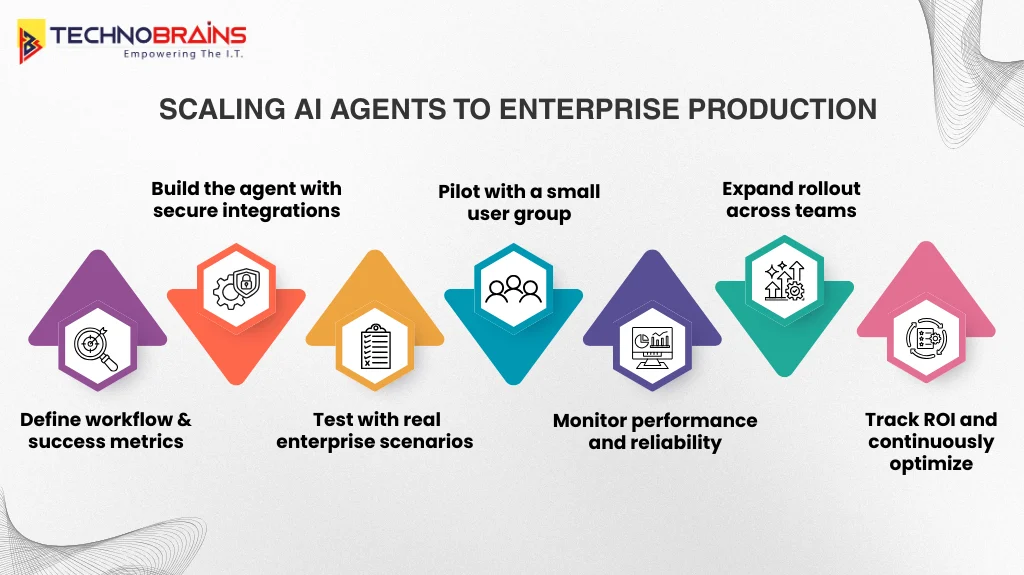
Agentic workflows scale well when you treat them like real production systems, not experiments. That means planning for traffic spikes, keeping tool access controlled, and making sure failures are handled in a predictable way. As usage grows, phased rollout, load testing, and the right metrics are what keep things stable.
- Plan for traffic: If your goal is to scale AI agents to 1000 users, assume you’ll hit peak demand at the worst possible time. Use queueing, rate limits, and backpressure so your core systems don’t buckle when everyone triggers the agent at once.
- Manage costs: Costs can quietly blow up if the agent keeps calling tools or looping through long reasoning. Cache repeat lookups, cut unnecessary tool calls, and cap long loops so latency and token usage stay under control.
- Load test early: Don’t wait for production to find the cracks. Simulate peak usage, measure tool failure rates, and validate that retries and timeouts don’t create loops, double actions, or messy side effects.
- Roll out in phases: Scale access gradually by team. Use feature flags, staged permissions, and fast rollback paths so you can contain issues before they hit the whole org.
- Track key metrics: At scale, opinions don’t help numbers do. Monitor completion rate, latency, error rate, and cost per successful task so decisions are driven by real performance data, not assumptions.
Common AI Agent Mistakes Enterprises Must Avoid
In 2026, AI agents are becoming part of everyday enterprise work, but projects slip fast when the scope is unclear, integrations are weak, or governance is missing. Avoid these mistakes early if you want results that scale.
- Unclear scope: Trying to build one agent for every use case leads to unpredictable behavior and weak outcomes. Start with one workflow, one owner, and a clear definition of success.
- Brittle integrations: Agents fail in production when tool connections are unstable or poorly designed. Use reliable APIs, consistent data models, and integration patterns that do not break with small system changes.
- Prompt-only safety: A prompt is not a security layer. If the agent can take actions, you still need approvals, allowlisted tools, and policy checks to prevent risky moves.
- No operations plan: Teams often ship a pilot without monitoring, runbooks, or clear ownership. If you hire AI developers for implementation, ensure they also cover production readiness, not just the demo.
- Wrong automation fit: Replacing working automation can waste time and increase risk without real gains. Use AI agents vs RPA correctly: apply agents where judgment is needed and RPA where steps are fixed.
- No success metrics: Without targets, it becomes impossible to prove value or improve performance over time. Define measurable goals early and track outcomes consistently after rollout.
How to Prove AI Agent ROI and Success Metrics
Clear metrics to show whether agents are completing real work, reducing operational effort, and delivering measurable ROI across enterprise workflows.
Operational performance
Measure whether the agent completes workflows end-to-end, not just produces answers. Use outcome-based signals to confirm reliability in real operations.
- Workflow completion: % of requests fully completed without human rescue.
- Cycle time: time from request creation to resolution delivered.
- Quality signals: reopen rate, reversals, corrections, policy violations.
Cost and efficiency
Keep spending tied to outcomes by tracking the cost of successful completions, not total usage. Pair it with effort reduction to confirm you are removing work, not shifting it.
- Cost per successful task: total model + tool-call cost for completed outcomes.
- Human effort removed: reduction in touches per request, not just “time saved.”
Adoption and business impact
Adoption should show up as repeat usage by the right roles and growing workflow coverage. Business impact should be visible in AI agent ROI metrics and KPIs that leadership already tracks.
- Adoption depth: repeat usage by role, workflow coverage, and opt-out rate.
- Business outcomes: deflection, SLA improvement, capacity created, revenue influence.
A Simple 90-Day Rollout Plan
A clean, practical way to take one use case from idea to a controlled production launch proves value early, keeps risk low, and sets you up to scale.
Days 1–30: Scope and foundations
Choose one workflow that happens often and has a clear finish line. Set success metrics, list the data/tools the agent needs, and capture a baseline so you can show improvement. Lock governance now: access rules, audit requirements, and which actions need approval.
Days 31–60: Build and validate
Build the workflow with allowlisted tool access, strong error handling, and a clear path for exceptions. Test real scenarios (including edge cases), then pilot with a small group and track where it fails and why people override it. If you’re using enterprise AI agent development services, agree on who owns integrations, runbooks, and ongoing optimization and support.
Days 61–90: Launch and scale
Roll out in cohorts using feature flags and staged permissions. Monitor completion rate, latency, and cost per successful task, then tighten prompts, policies, and routing based on real usage. Document what worked into a simple playbook and end with a clear ROI-linked roadmap for the next workflow.
Final Thoughts
Building AI agents for enterprise apps is not about adding another chatbot. It is about shipping agents that complete real workflows, respect permissions, and stay reliable under everyday production pressure. If an agent is slow, unsafe, or inconsistent, teams lose trust quickly and adoption drops.
That is why choosing the right AI agent development company matters. A strong partner focuses on secure integrations, clear guardrails, and measurable outcomes, not just a polished demo. The goal is to prove value fast without creating operational risk or compliance headaches.
TechnoBrains helps enterprises build dependable agents with practical architecture, controlled deployments, and measurable ROI. For teams ready to launch production-ready AI agents, we offer a clear, execution-focused approach backed by ongoing optimization and support.
FAQs
What is an AI agent in an enterprise app?
Think of an enterprise AI agent as a digital worker inside your app. You give it a business request, it finds the right internal context, and then it actually carries out the task using approved tools or APIs. A chatbot mainly talks, but an agent is built to take action and finish the job.
Why is orchestration important for enterprise agents?
Because real enterprise work isn’t a neat one-step flow, it’s usually a chain of steps with dependencies, handoffs, and approvals, and things can fail mid-way. Orchestration keeps everything coordinated so the agent knows what to do next, when to pause, how to retry, and how to complete the workflow reliably.
What should we validate before going live?
Before rollout, don’t just test it in a polished demo; run it in real scenarios. Make sure it handles edge cases; fails safely; works consistently with your data and tools; and that permissions, audit logs, rollback options, and any needed custom AI development for integrations are sorted.
How do enterprises keep agents secure and compliant?
They lock agents down like any other powerful system. Access is tied to identity, tools are allowlisted, and high-risk actions require approvals. Everything is logged end-to-end, and external inputs are treated as untrusted with strict data boundaries, so you reduce leakage and manipulation risk.
What matters after launch to keep agents performing well?
Once it’s live, the environment keeps changing workflows, policies, systems, all of it. That means the agent needs regular tuning and maintenance. Monitoring, quality reviews, and updates are what keep performance steady and stop things from drifting over time.