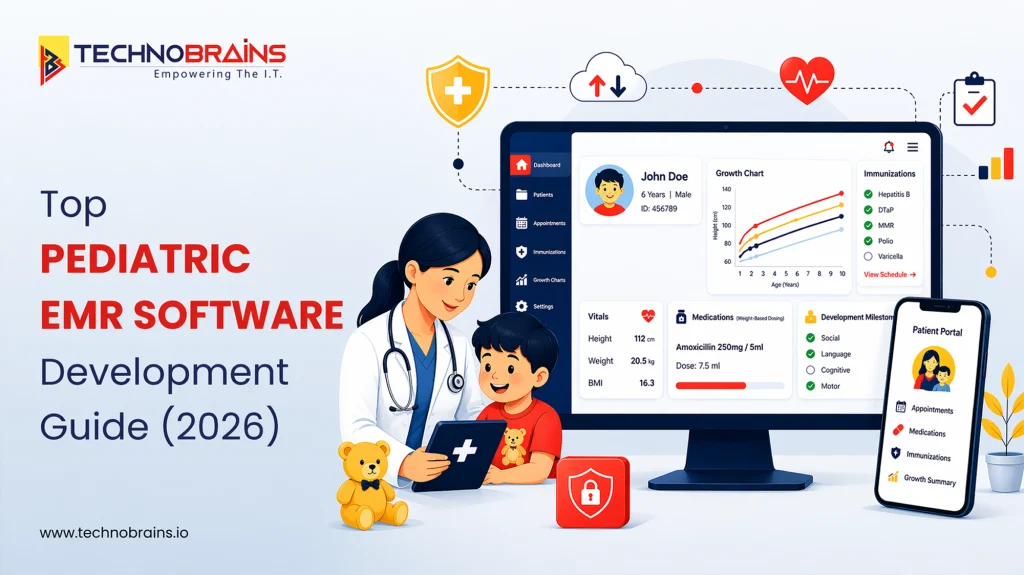
If you run a pediatric practice, you already know that generic EMR software often falls short. A generic system provides basic functions but creates additional difficulties for pediatric medical professionals. Pediatric care requires specialized workflows like growth tracking, immunization schedules, weight-based dosing, and developmental milestone monitoring. Some standard systems are not designed to handle.
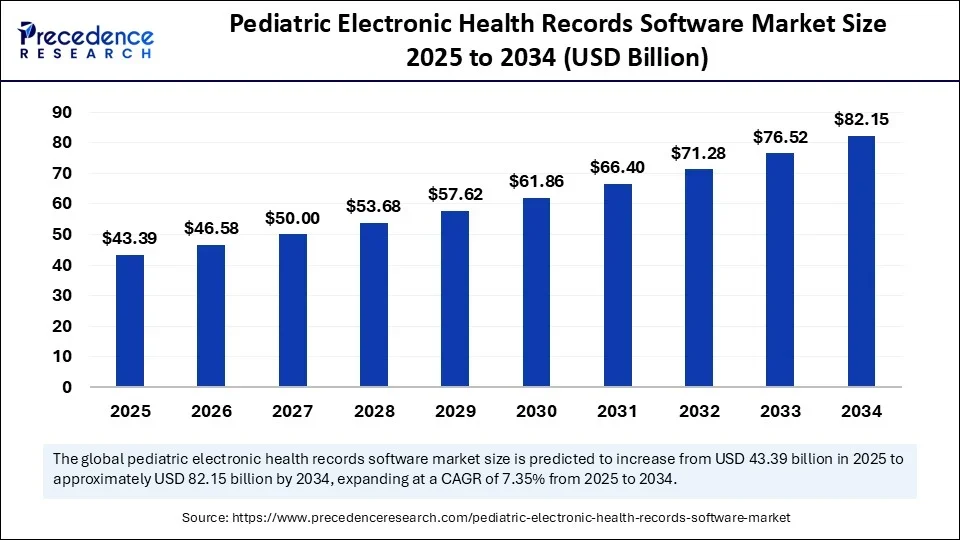
That is one reason a special digital platform for pediatric practices is getting more attention in 2026. According to Precedence Research, the global pediatric electronic health records software market was valued at USD 40.42 billion in 2024 and is projected to reach USD 82.15 billion by 2034, growing at a 7.35% CAGR. That growth reflects a clear shift toward more specialized pediatric EHR software.
In this Blog, we cover what matters in pediatric EMR development, from the features to integration, challenges, and development cost.
What Makes Pediatric EMR Software Different From Standard EMR & EHR Platforms
- A standard system is built to manage records. Pediatric care needs more than that. It has to support growth, vaccines, developmental tracking, and age-based care in a way that fits daily practice.
- Children’s health data keeps changing with age. A custom pediatric EMR software handles changing vitals, dosing, and care more naturally.
- Pediatric clinics also need features that general systems often do not handle well, like growth charts, immunization management, and parent access.
- Workflow matters too. Pediatric teams deal with frequent follow-ups, preventive visits, and guardian communication, so the software should make that easier, not more manual.
- Pediatric care has unique needs that require software specifically designed for children, not adapted from adult systems.
Features of EMR Software for Pediatric Practices
A reliable pediatric system enables everyday care to be easier, safer, and less manual. The right features help providers document faster, track a child’s progress more clearly, and manage routine pediatric workflows without unnecessary friction.
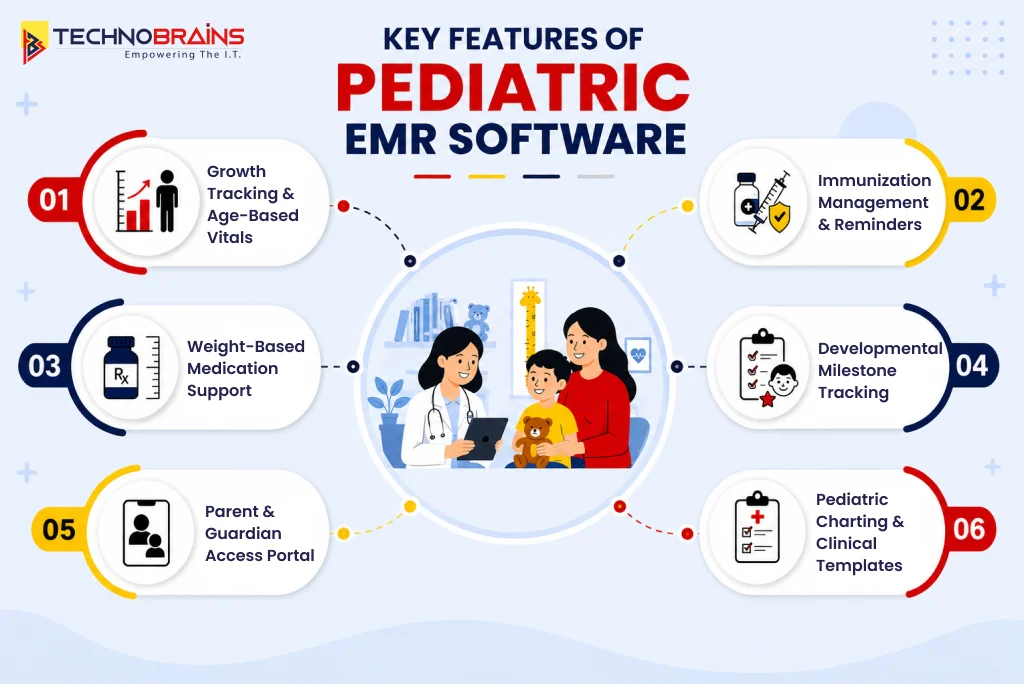
Growth charts and age-based vitals
A pediatric system allows users to monitor height, weight, BMI, head circumference, and age-specific vital signs throughout the entire monitoring period. This feature works as a vital component because medical staff require immediate access to detect developmental changes in growing children.
Immunization tracking and reminders
Vaccine tracking is part of everyday pediatric care, so the system should help manage schedules, reminders, and quick access to records. It remains one of the most practical features of pediatric EMR software because it helps reduce missed follow-ups and extra manual work.
Weight-based medication dosing
Medication support in pediatrics needs more precision than a general workflow usually provides. A strong setup helps clinicians calculate doses more safely.
Developmental milestone documentation
Pediatric visits are also about tracking how a child is developing over time. The EHR software makes it simple to record milestones, follow progress, and flag concerns early without making charting feel heavy.
Parent and guardian access
Parents are closely involved in pediatric care, so access matters. A good system should make it easier to view records, manage appointments, and stay updated.
Pediatric charting templates and clinical notes
Charting should feel quick and natural during busy visits. Age-specific templates and cleaner note flows help teams save time and keep documentation more consistent, which is where well-planned custom pediatric EMR software can benefit from the right custom software development approach.
Key Technologies and Integration Considerations for Pediatric EHR Systems Development
A pediatric system needs both an effective interface and appropriate technology solutions. The technology needs to enable seamless data sharing between different systems while maintaining dependable access and creating unified operational procedures that connect healthcare providers with laboratories, pharmacies, and families.
| Technology Area | Recommended Setup | Why it Matters |
|---|---|---|
| Backend | Node.js, Python, or similar frameworks | Supports pediatric logic like growth tracking, dosing rules, and vaccine workflows. |
| Interoperability | HL7, FHIR, secure APIs | Helps the platform connect with labs, pharmacies, hospitals, and external care systems. |
| Database | PostgreSQL or another relational database | Keeps patient history, guardian details, and clinical records structured and easier to manage. |
| Cloud Infrastructure | HIPAA-ready cloud environment | Supports secure storage, scalability, and easier access across locations. |
| Frontend | Responsive provider interface | Helps clinicians and staff use the system more smoothly during daily workflows. |
Start with strong interoperability standards
A pediatric platform enables data sharing from day one. It becomes operational through system links that use HL7 and FHIR standards to connect with hospitals, laboratories, pharmacies, and other healthcare facilities.
Lab and pharmacy integrations should feel seamless
Providers should be able to view test results, prescriptions, and refill history without jumping between systems. The efficient operation of these connections results in time savings while reducing the need for manual work.
Immunization registry integration matters more
Vaccine records need to stay current and easy to find. Practices maintain better record accuracy through immunization registry connections, which provide reliable reminder systems and help them avoid record gaps.
Cloud and device access should support daily use
Pediatric teams use desktops and tablets, along with family-facing portals, in their work. The system provides users with a consistent experience that operates the same way across all locations.
Security and data control need to be planned early
The system requires built-in access rules together with audit trails and secure data handling. These elements are established during development to achieve ongoing system security and reliability.
How to Build Pediatric EMR Software: Step-by-Step Guide
Building a pediatric platform takes more than turning requirements into screens. The system has to fit how pediatric care actually works, from routine checkups and vaccine tracking to growth monitoring and parent communication. A better approach is to build in clear stages, so the product is easier to design, test, and improve over time.
Workflow Discovery
Every strong project starts with understanding the practice before writing code. In pediatric EMR development, it helps define what the system really needs to support daily.
- Map common visit types, from well-child visits to follow-ups
- Understand growth, immunization, and medication workflows
- Define how parents or guardians will interact with the system
- Identify reporting, compliance, and operational needs
Product and UX Design
Once the workflow is clear, the product needs to be designed around pediatric use, not a generic clinic setup. This is where the system starts to feel practical for real providers rather than just a standard template.
- Create simple charting flows for faster documentation
- Design screens for growth charts, vaccine records, and milestones
- Keep provider actions easy to reach during busy visits
- Make the experience clear for both staff and families
Core Platform Development
This is where the main system starts coming together. The goal is to build custom software that supports the core clinical and operational needs first, before expanding into more advanced capabilities.
- Build patient records, visit notes, and user roles
- Add growth tracking, immunization logic, and dosing support
- Set up parent or guardian access where needed
- Keep the architecture flexible for future changes
Integration and Data Exchange
A pediatric platform becomes much more useful when it connects well with the systems around it. This step is important as it works beyond basic charting and supports connected care.
- Connect labs, pharmacies, and immunization registries
- Enable cleaner data exchange with healthcare standards
- Sync scheduling, billing, or external care tools when needed
- Make sure records move smoothly across the workflow
Testing, Rollout, and Improvement
Launch should not be seen as the end of the process. It still needs proper testing, staff training, and ongoing improvements to work well in real clinical settings. That is where the right development partner can make the rollout much smoother.
- Test clinical logic, calculations, and permissions carefully
- Check integrations and data flow before rollout
- Train staff in phases instead of switching everything at once
- Improve the platform after launch based on real usage
Build a Pediatric EMR System that fits your workflow
A pediatric platform should fit the way your practice works. Talk to TechnoBrains to build a pediatric EMR system tailored to your clinical workflows, patient needs, and long-term growth.
Get a Free Consultation!
Biggest Challenges in Building Pediatric EMR Software and How to Solve Them
Creating a pediatric platform goes far beyond its technical components. The main difficulty exists in establishing a system that meets clinical requirements while providing adequate support to staff members and maintaining operational stability during practice expansion. The development of pediatric EMR systems requires more careful planning because it needs different methods compared to standard healthcare system development.
Age-Based Clinical Complexity
Pediatric care changes fast, and the system has to keep up with it. Growth charts, weight-based dosing, immunization schedules, and developmental records all depend on age, which makes the logic behind pediatric software much more detailed than a general system.
How to solve it
The best way to handle this is to build around pediatric rules from the start. Instead of forcing providers to rely on workarounds, the platform should support age-based workflows naturally so charting, dosing, and follow-up care feel easier to manage.
Integration Gaps
A pediatric system can quickly become frustrating when records are scattered across different tools. If lab results, pharmacy updates, and vaccine records are not connected well, teams end up doing more manual work and wasting time during care.
How to solve it
The solution is to plan integrations early instead of treating them like a later add-on. A stronger development strategy usually includes clean data exchange with the systems providers that they already depend on every day.
Parent and Guardian Access
Pediatric records often involve more than one user, which makes access harder to manage. Parents need visibility into appointments, forms, and records, but the platform also has to keep permissions clear and avoid creating confusion for staff.
How to solve it
This usually works best when access is designed with clear roles from the beginning. A well-planned system gives families the information they need while still keeping provider workflows organized and controlled.
Staff Adoption and Usability
Even a strong product can struggle if it feels slow or complicated during visits. In real practice, teams need a system that helps them move faster, not one that adds more clicks and extra admin work throughout the day.
How to solve it
That is why usability has to be treated as part of the core build. Teams offering pediatric EMR development services usually get better results when they design around real visit flows, simpler charting, and practical day-to-day use.
Security and Long-Term Scalability
Security becomes more complex when the system includes integrations, family access, and a growing volume of patient data. A platform that works for one clinic today may become harder to manage later if scale and control are not planned early.
How to solve it
The stronger approach is to build the foundation with growth in mind. That is where the right team with experience in healthcare software development services can help, especially when the goal is custom pediatric EMR software that stays secure, stable, and easier to improve over time.
Custom Pediatric EMR vs Off-the-Shelf Software: What Should You Choose?
The right option depends on your practice requirements. Off-the-shelf tools can work well for simpler setups, while custom builds make more sense when workflows, integrations, and long-term control matter more.
| Option | Best fit | What to keep in mind |
|---|---|---|
| Off-the-shelf pediatric EMR | Practices that need a faster setup | Easier to start with, but often limited in flexibility |
| Custom pediatric EMR | Teams with specific pediatric workflows | Better fit and more control, but higher upfront effort |
An off-the-shelf system can be a suitable solution when your business requires standard functionality, and you need to begin operations immediately. The custom-built solution becomes the preferred choice for your team because they need to manage all aspects of their workflows, system connections, and user experience design. The standard tools become insufficient for many providers because they require assistance from a pediatric EMR software development company to meet their business needs.
The biggest advantage of custom is that the system can be shaped around your practice instead of the other way around. It also gives more room to grow over time, though the pediatric EMR software development cost is usually higher at the start. For teams planning a more tailored product, AI development services can also become useful later as the platform evolves.
How Much Does Pediatric EMR Software Cost to Develop?
The cost depends on how complex the product needs to be. A simple build with core pediatric workflows will cost much less than a platform with deeper integrations, reporting, and family-facing tools. If the roadmap also includes parent access or patient engagement, the overall budget usually goes up further.
| Build level | Typical scope | Estimated cost |
|---|---|---|
| Basic | Core charting, growth tracking, immunization workflows, and simple user roles | $50,000–$100,000 |
| Mid-level | Stronger workflows, lab and pharmacy integrations, parent access, reporting | $100,000–$200,000 |
| Advanced | Full interoperability, automation, analytics, and broader product scale | $200,000–$300,000+ |
Looking for a Custom Pediatric EMR Development Partner?
The right build starts with the right product strategy. Connect with TechnoBrains to discuss a solution built for long-term growth and usability.
Talk to Our Experts!
Conclusion
Pediatric care software aligns with the specific operating methods that define this medical specialty. The system enables pediatric teams to access essential information on growth tracking, immunization records, dosing, and developmental records through its user-friendly design. The correct pediatric EMR systems help healthcare professionals and organizations to reduce manual tasks while enhancing daily operations and providing doctors with a system that matches actual pediatric care procedures.
At TechnoBrains Business Solutions, we develop user-friendly systems through our process of creating reliable products that meet real clinical requirements. We aim to develop a pediatric practice platform that will support the operations throughout the entire development.
FAQs
Pediatric systems exist to deliver medical services that focus on treating children. The system provides daily operational support for multiple features, including growth charts, vaccine tracking, weight-based dosing, developmental records, and parent access rights.
The timeline depends on the scope of the product. A small system requires three months for construction, but a complete system needs more time to finish because it includes all testing and compliance procedures with additional integrations.
The cost of a project is determined by its required features, together with system connections and regulatory requirements. That is why pediatric EMR software development costs can look very different from one project to another.
Yes, it can be built to connect with all of them. A well-planned setup can link labs, pharmacies, registries, and even a telemedicine app to keep workflows more connected.
Your choice depends on how exactly your requirements define your project. Ready-made tools can work for simpler setups, while custom pediatric EMR software for pediatric practices is often better when flexibility and control matter more.